
Web AuthoringWebAthletes8 min
Build Programs On Web
Use the larger web builder for weeks, training days, metadata, exercises, set targets, and publishing readiness.
Updated May 9, 2026
Build The Structure First
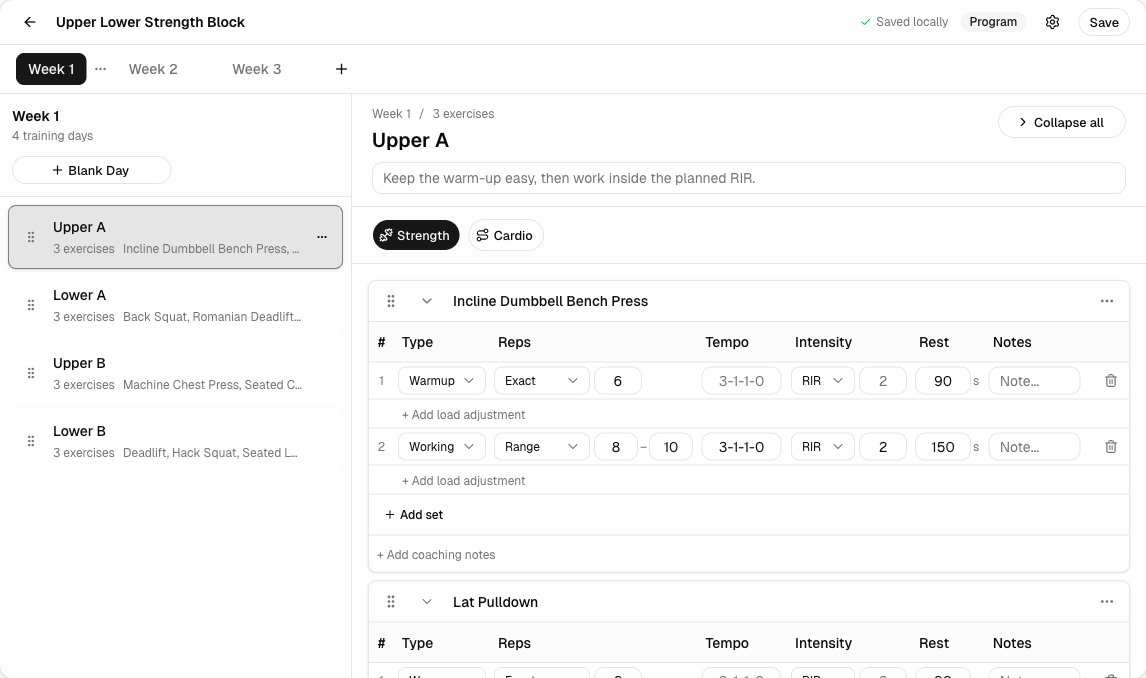
Start with the program shell, then add weeks and training days before refining every set. The builder is easier to reason about when the structure is already visible.
Set the program basics
Name, description, preview copy, category, tags, difficulty, estimated duration, and visibility all live with the program metadata.
Create weeks and days
Build the week strip and day rail before filling in every exercise detail.
Add exercises and sets
Add movements, target reps, load guidance, notes, and any advanced prescription fields the program needs.
What The Web Builder Handles Better
- Large program structure changes across several weeks.
- Saved session imports and reusable day templates.
- Advanced set prescriptions that need more horizontal space.
- PDF export and administration actions on existing programs.