
Start HereWeb and mobileAthletes7 min
Basic Vs Advanced Tracking
Choose how much prescription detail Kiron should manage without confusing tracking mode with workout logging itself.
Updated May 9, 2026
What Tracking Mode Actually Changes
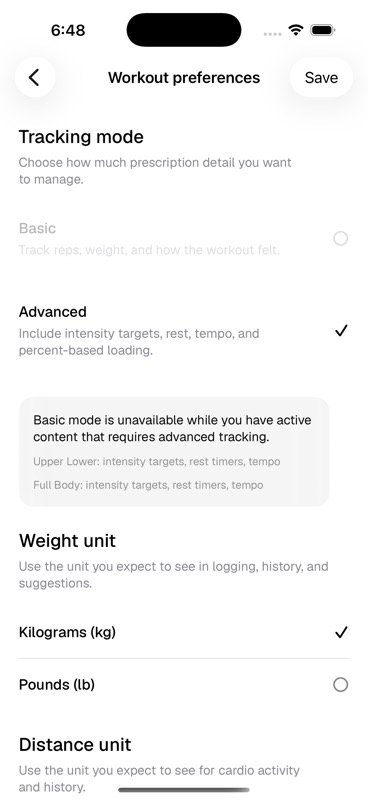
Tracking mode controls how much programming detail Kiron asks you to manage. It is about detail level, not whether training is recorded. Basic mode keeps the logging surface simpler. Advanced mode unlocks the prescription fields used by more detailed strength programming.
- Basic
- Best when you want simple workout logging around reps, load, and how the session felt.
- Advanced
- Adds intensity targets, rest timers, tempo, percent-based loading, and advanced program compatibility.
- Smart loads
- Available with Advanced tracking. Kiron can suggest starting loads from recent history, but every suggestion stays editable.
Why Basic Can Be Blocked
Kiron will not let you switch to Basic while active or scheduled content still requires Advanced fields. A program that uses RIR, RPE, rest timers, tempo, or percent-based loading needs Advanced tracking so the workout logger can show the prescription correctly.
- Active Pro content can require Advanced tracking.
- Active or paused schedules can block a switch if their program uses Advanced requirements.
- Marketplace checkout can ask you to upgrade tracking mode before adding a program that depends on Advanced fields.